
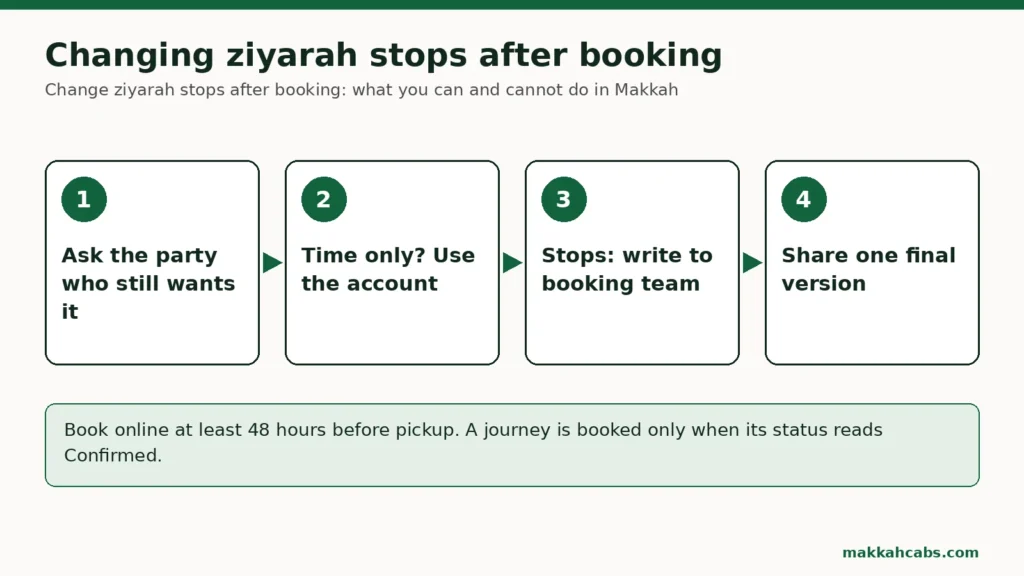
If you want to change ziyarah stops after booking, you cannot do it yourself from your account. On Makkah Cabs, the stops are part of the journey you paid for, alongside the pickup, the destination, the passengers and the vehicle. The only thing you can change online is the pickup time. Adding, removing, swapping or reordering a stop needs the booking team, or a new booking plus a cancellation request, and a cancelled booking remains subject to our cancellation terms (free cancellation with a full refund up to 48 hours before pickup; inside 48 hours the deposit element of the price is kept) when the customer cancels.
This guide is for anyone who has already paid for a ziyarah journey in Makkah (Mecca) and now wants a different set of stops, and for anyone about to book who would rather get the stops right first time. It explains why stops are fixed at booking, which changes are realistic, how to ask the booking team, when a fresh booking makes sense, and what to do when the person who asked for a stop is no longer coming. It also includes a worked example and a checklist.
Stops fixed at booking: why they cannot be edited online
A Makkah Cabs journey is one pickup place, one destination, a date and time in Saudi local time, the passengers and bags, and up to eight stops in the order you enter them. When you search, the route is measured through those stops in that order, and the vehicle classes you see are the ones that pass the capacity check for your party and luggage.
Everything that follows, the price, the vehicle and the driver’s plan for the day, comes from that route. That is why stops fixed at booking cannot be edited from your account the way a pickup time can, and why the booking team, not the driver, has to look at any change. A different stop is a different route. It may be longer or shorter, it may head in another direction, and it may affect the driver’s next job.
The route summary before payment is the moment to catch mistakes. Our guide to ordering the stops on a multi-stop Makkah visit explains how to sequence them so the route makes sense.
What counts as a change to the stops
People describe stop changes in many ways. It helps to know which kind yours is, because they are handled differently.
| Change you want | Can you do it online? | What it means for the route | Usual way forward |
|---|---|---|---|
| Different pickup time, same stops | Yes, by requesting a new pickup time | None | Account request; £5 fee if approved |
| Remove a stop | No | Route shorter, may change direction | Ask the booking team |
| Add a stop | No | Route longer | Ask the booking team, or book an extra journey |
| Swap one stop for another | No | New route | Ask the booking team, or rebook |
| Reorder the stops | No | Route may change considerably | Ask the booking team |
| Change the final destination | No | New journey | Ask the booking team, or rebook |
| Change the number of people | No | Vehicle may no longer fit | Ask the booking team |
The table covers journeys that are paid and not yet started. Before you pay, you can change anything by editing your search.
The one change you can make online: the pickup time
From your account, a paid booking can carry a “Request a new pickup time” request, made before the original pickup time. You choose a future time and can add a note. The status then reads: “Request received. It remains pending until the booking team approves it.”
If the new time is approved, a £5 rescheduling fee, converted into your booking currency, is added to the cash you pay the driver at pickup. The booking team may waive it. If the request is rejected, it costs nothing. Only one open time request is allowed per booking.
A time request cannot carry a change of stops. The note field is for context, such as “the museum has told us our session starts later”, not for rewriting the route. If you need both a new time and new stops, contact the booking team about the stops.
How to change ziyarah stops after booking with the booking team
If you still want to change ziyarah stops after booking, write to the booking team through the contact page. A clear request gets a clear answer. Include:
- The booking reference.
- The journey date and pickup time.
- The stops as booked, in order.
- The stops you want instead, in order, with the same place names the planner uses.
- Why, in one sentence. For example, “our grandmother is no longer coming and she was the one who wanted the museum”.
- Whether anything else is changing, such as the number of passengers.
Then wait for a written answer. The booking team will tell you whether the change can be made and on what terms. Until you have that answer, the booking stands exactly as it was, and the driver will follow the route as booked.
Do not ask the driver to rearrange the route on the day. The driver works to the confirmed journey. A request at the roadside puts them in an awkward position, and it will not change what the booking covers.
Remove a stop from a Makkah journey
Removing a stop is the most common request, and the easiest to understand. Someone has lost interest, a site’s hours no longer fit, or the day has become too long.
Before you write, ask whether you really need to remove a stop from a Makkah journey at all. If the car will pass the place anyway, the question is only whether anyone gets out. Some families simply decide at the stop that nobody will leave the car. That is not a change to the booking, and it does not alter what was paid, so do not expect a lower price for it. Tell the driver politely when you reach it, and confirm with the booking team beforehand if you are unsure how long a stop is expected to take.
A genuine removal, where the route itself should change, is a matter for the booking team. A shorter route does not automatically mean a lower price, and the minimum booking value equivalent to £40 applies to every journey.
Adding a stop after booking
Adding a stop usually makes the journey longer, so it needs a fresh look at the route. You have two ways to approach it.
Ask the booking team to add the stop to the existing journey. They will tell you if it can be done.
Book a separate journey. If the new place is one you would visit after the others, it can be simpler to book one more journey from the last stop to the new place, then from there to the hotel. This keeps the original booking untouched. Each new booking needs at least 48 hours’ notice before its pickup, and each journey has the £40 minimum booking value.
Adding Masjid Aisha is a frequent case. The mosque is a popular location in the planner, and Saudipedia places Masjid al-Taneem about 7.5 km north of the Grand Mosque on the Makkah to Madinah road. Our guide on combining Masjid Aisha with other ziyarah stops covers whether it belongs in the same outing at all.
The new booking plus cancellation route
Sometimes the change is too large for an amendment. The group wants a different day, a different vehicle and a different set of places. The practical route is then a new booking for the plan you actually want, followed by a cancellation request for the old one.
Understand the cost before you do this. Bookings are subject to our cancellation terms (free cancellation with a full refund up to 48 hours before pickup; inside 48 hours the deposit element of the price is kept) if the customer cancels. A cancellation request on the old booking will be acknowledged, and the acknowledgement says the booking is not cancelled until an approval notice is issued, but it does not bring your money back. In practice you pay twice.
A full refund for the affected journey applies only when we or the transport partner cancel or cannot supply the journey and no suitable alternative is accepted. The cancellation and refund policy sets out the detail.
So the new-booking route makes sense only when the old journey is genuinely useless to you, and paying again is better than making do. Before deciding, ask the booking team whether an amendment is possible.
When the person who wanted the stop is no longer joining
Many stop changes start with a person, not a place. A relative asked for the Holy Quran Museum at Hira Cultural District, and now they are not coming.
Before removing the stop, ask the people who are still coming. Someone quiet during the planning may have been looking forward to it too. If nobody wants it, the stop can go, but three other things usually change at the same time.
- The number of passengers. This cannot be changed online either. Tell the booking team. The vehicle stays the one you booked unless they agree otherwise.
- Tickets. Hira Cultural District sells tickets for its exhibitions and museums through the “Book now” links on its official experiences page. That is a separate purchase with its own terms. Removing the stop from the journey does nothing to the ticket, and cancelling the ticket does nothing to the journey.
- The return. If the absent person was the one who needed an early return, that extra journey may no longer be needed. It is still a paid booking under the same cancellation terms.
Our article on counting passengers for a Makkah taxi covers what happens when someone drops out.
Deciding the stops before you pay
Most stop changes can be avoided with a little honest planning before payment. Work through these questions with the whole party.
Is every stop wanted by more than one person?
A stop that only one person cares about is the stop most likely to disappear. Keep it, but know that it is the fragile one.
Is it a visit or a view?
Some places are seen from outside, others are entered. Jabal al-Nour, for example, is described by Saudipedia as about 4 km north-east of the Grand Mosque, and many families view it from below or visit the district beside it. Our guide to Makkah ziyarah sites seen from outside versus places you go in helps decide which is which.
Will it be open?
Check official hours for anywhere you enter. Hira Cultural District lists different hours for the district and path, which it shows as open 24 hours, and for its museums and exhibitions, which vary by day of the week. Hours can change, so check again close to the date.
Does the order make sense?
Collect before you drop, put fixed-time visits where they can be met, and finish where the next thing starts.
Is there a plan B?
If one site might be closed or crowded, decide the alternative now. Our guide to a plan B for a Makkah ziyarah site that is closed or busy sets this out.
Once you are sure, use the basket’s option to email a secure review link to another adult in the party, so someone else can check the stops before one person pays.
Worked example: the Farooqi family drop a museum and add a mosque
Samina Farooqi booked a Saturday afternoon journey for six people: from the Hilton Hotel & Convention Jabal Omar, with stops at Hira Cultural District and Jabal Thawr Cultural District, ending at the hotel. The route summary looked right, she paid, and the booking showed Confirmed the same evening.
On Wednesday her uncle, who had asked for Jabal Thawr, decided to spend the afternoon at the hotel with his wife. The group was now four, and the remaining adults wanted Masjid Aisha instead.
Samina’s first message to the family was a question: does anyone still want Jabal Thawr? Nobody did. Her second was to the booking team, with the reference, the date, the stops as booked, the stops she now wanted, and the new passenger count.
The booking team replied that they could look at the change, and explained the terms. Samina compared that with a new booking and a cancellation request for the old one, and realised the second option meant paying twice. She accepted the amendment.
On the Saturday, the family’s own printout of the old route went in the bin. The only version shared in the family chat was the one in the account after the change.
The lessons are simple: ask the party first, write to the booking team with everything in one message, and keep only one version of the plan.
Common reasons for a stop change, and a better answer to each
Before you ask to change ziyarah stops after booking, check whether the real problem is the stops at all. Often it is something else, and there is a simpler fix.
“We will be late getting ready”
That is a time problem, not a stops problem. Request a new pickup time from your account, before the original pickup time, and keep the stops as they are.
“The site might be closed that day”
Check the official hours for the date. If the site is closed, you need the booking team, but if it is only busy, arriving at a different hour may solve it without touching the route.
“Grandma will be too tired for three places”
Consider whether she needs an earlier ride back rather than a shorter route for everyone. A separate one-way journey for her and a companion keeps the rest of the plan intact.
“A friend told us about somewhere else”
New ideas are the main source of late changes. If the new place is on the way, ask the booking team. If it is not, it may fit better on another day as its own outing.
“It is too hot to walk around outside”
A view from the car or a short stop may be enough at an outdoor site. That does not change the route, only what you do when you get there.
Sorting the reason first keeps your request to the booking team short, and it often means you do not need one at all.
Keeping everyone on the current version
Stop changes leave old versions lying around. A relative has a screenshot of the first plan; someone told the hotel reception a different time; a teenager is sure the museum is still on.
- One source of truth. The account shows the booking, its status and, once assigned, the driver’s name. Treat that as the plan.
- One message to the family after any change, with the final stops in order.
- Check the confirmation email that follows any change, and the driver-assigned email once it arrives. That email includes the vehicle registration and meeting instructions.
- Tell the hotel only what it needs, which is usually the pickup time and meeting place.
Checklist before and after a stop change
- Before paying, agree every stop with the whole party, in order.
- Mark any stop that only one person wants.
- Check official opening hours for places you will enter.
- Send the secure review link to a second adult before payment.
- After paying, wait for Confirmed before sharing the plan.
- If a stop must change, ask the party first, then write to the booking team with the reference, the old stops and the new ones.
- Use a time request only for time; it cannot move stops.
- Remember that a customer cancellation is subject to our cancellation terms (free cancellation with a full refund up to 48 hours before pickup; inside 48 hours the deposit element of the price is kept) before choosing to rebook.
- Deal with any site tickets separately with the venue.
- Share one final version of the plan and delete the old ones.
When you know which places matter to everyone, open the Makkah Cabs planner, enter the stops in order and read the route summary carefully before you pay.